Ensuring that your billing details, and especially your card details are up to date is quite important and helps in avoiding failed payments. If a payment fails during a renewal period, your subscription may become inactive, which can temporarily limit access to updates and support. Additionally, if the product price changes, you may lose the ability to renew at the original purchase price.
Steps to Change the Card used
To update the card linked to your subscription, please follow these steps:
1. Log in from the account page here using your Simple Calendar account credentials
2. Navigate to the subscription page here
3. Next to your active subscription, click on the “update payment method” link
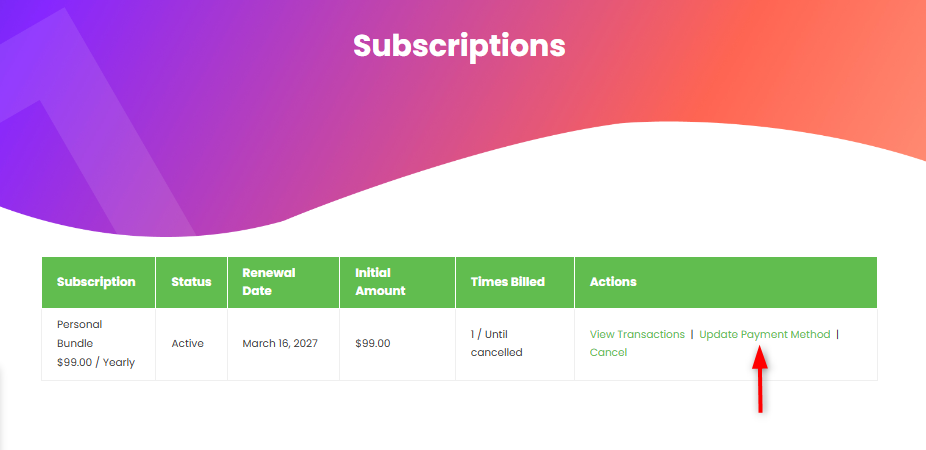
4. On the next screen, select card as your payment method, and enter your updated card details (card number, expiry date, and CVC)
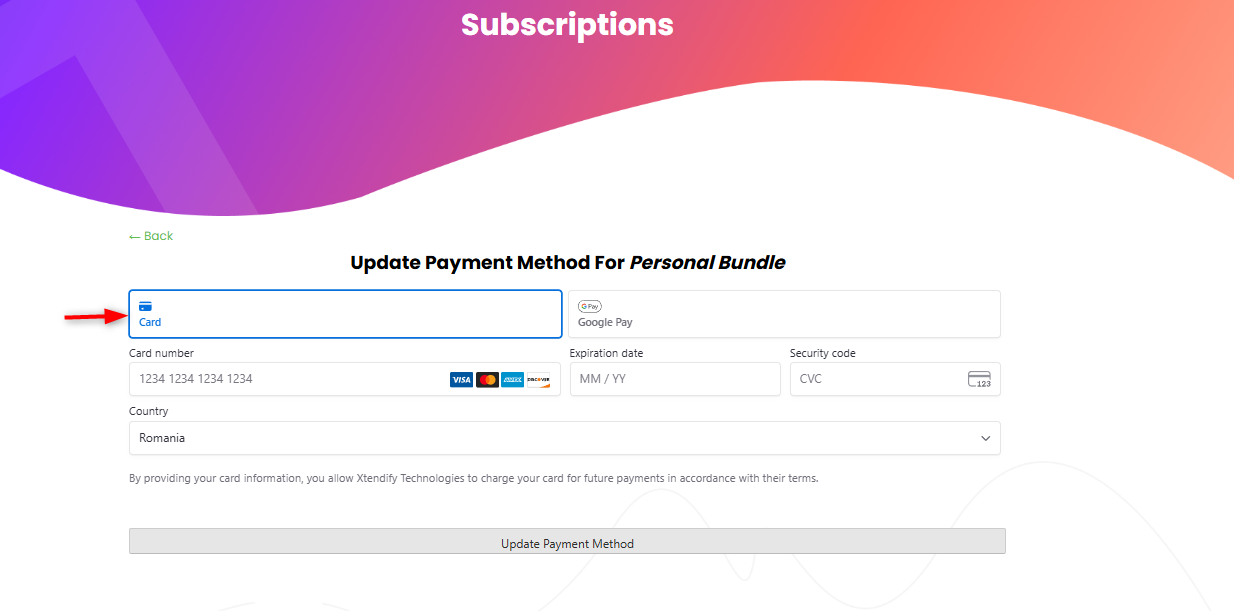
5. Next, click on the “Update Payment method” button to save your changes
Once completed, your updated card will be used for all future billing cycles. When your current subscription period ends, it will automatically renew using the new payment method. This ensures you maintain uninterrupted access to product updates and support.