As of Simple Calendar version 4.0.3, the Simple Calendar plugin now enables you to conditionally have events redirect to custom URLs when clicked on. The implementation is based on Event IDs, which determine which events should redirect to a custom URL, and which should continue redirecting to the default Google Calendar event page.
The Shortcode Structure
[if-event id–in=” “]
[link url=”test.com”]See more details[/link]
[/if-event]
[if-event id–not-in=” “]
[link]See more details[/link]
[/if-event]
How the Shortcodes Work
1. [if-event id–in=” “]
This shortcode means that if an event ID matches the specified Event ID(s), then apply the custom URL defined inside: url=”test.com”
Example behavior: Clicking the event link redirects users to your custom URL instead of the default Google Calendar event page.
2. [if-event id–not-in=” “]
This shortcode means that if an event ID does NOT match the specified Event ID(s), then apply the default Google Calendar event redirect.
Example behavior: Events not included in the specified IDs will continue redirecting to their standard Google Calendar event page.
Multiple Event IDs
You can optionally define multiple Event IDs by separating them with commas.
Example:
[if-event id–in=”event_id_1,event_id_2,event_id_3″]
Custom URL
Replace: test.com with your own preferred URL.
Example:
[link url=”https://yourwebsite.com/custom-page”]
How to Identify the Event ID
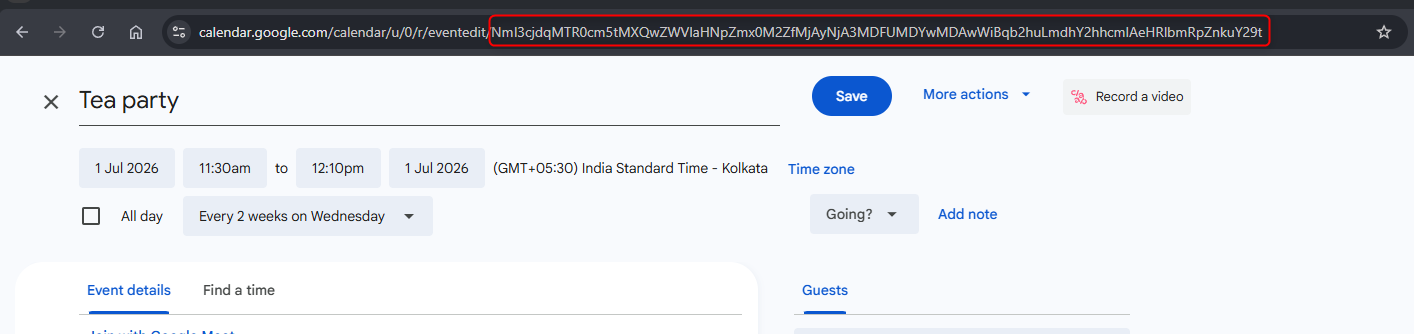
In order to identify Event Id’s, you will need to:
– Navigate to Google Calendar
– Click on the event
– Within the event edit page, you will see the ID of the event
Below is a sample screenshot of this:
Example
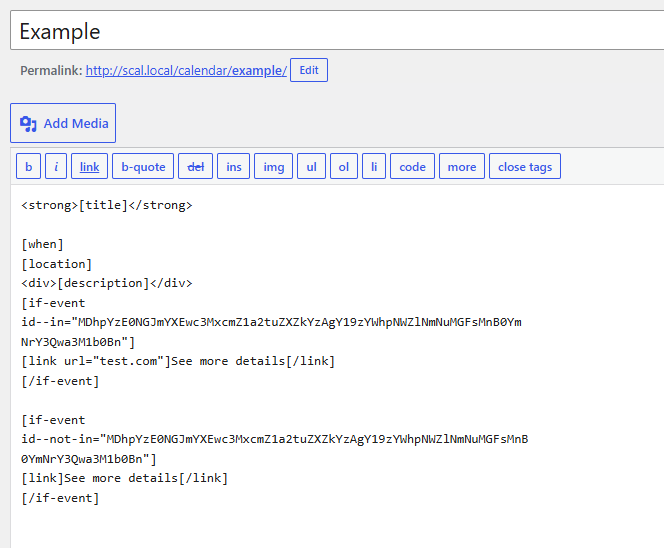
[if-event
id–in=”MDhpYzE0NGJmYXEwc3MxcmZ1a2tuZXZkYzAgY19zYWhpNWZlNmNuMGFsMnB0Ym
NrY3Qwa3M1b0Bn”]
[link url=”test.com”]See more details[/link]
[/if-event]
[if-event
id–not-in=”MDhpYzE0NGJmYXEwc3MxcmZ1a2tuZXZkYzAgY19zYWhpNWZlNmNuMGFsMnB
0YmNrY3Qwa3M1b0Bn”]
[link]See more details[/link]
[/if-event]
In the above example, upon clicking on the see more details link on the event with ID, MDhpYzE0NGJmYXEwc3MxcmZ1a2tuZXZkYzAgY19zYWhpNWZlNmNuMGFsMnB0YmNrY3Q
wa3M1b0Bn, it will redirect to test.com, and clicking on any other event’s see more details link other than that with this ID, it will redirect to the default Google Calendar event page.
The Shortcodes need to be added to your Calendar within the dashboard as illustrated below: